
- Prepare ID + matching proof of address before you click Get Started — country mismatches cause most KYC delays
- Registration is online: country, email, password, optional partner code FXTRD
- KYC usually clears within about 24 hours when documents are clear and in colour
- Micro is the practical beginner account type; min deposit is typically $5 in eligible regions
- Welcome offers are country- and entity-based ($100 or $30 patterns) — verify the live tile, never assume auto-credit
- Demo first, then micro-lot live trades with a written stop-loss before scaling
- TL;DR — XM Account Opening in One Screen
- Before You Start: What You Need
- Short Answer
- Detailed Explanation
- Example
- Common Mistake
- Professional Tip
- What Is XM? (Context, Not Hype)
- Step 1: Fill the Registration Form
- Third-party videos (independent creators)
- Step 2: Choose Account Type
- Step 3: Identity Verification (KYC)
- Step 4: Check Welcome / Deposit Bonus (If Shown)
- Step 5: Make Your First Deposit
- Step 6: Download the Platform and Place a First Trade
- Checklist — Open XM Without Avoidable Friction
- Glossary
- Key Takeaways
- Related Reading
August 2026 field note: XM details vary by country and legal entity. Official pages list multiple group licences, 1,400+ instruments, and MT4/MT5/WebTrader/app access. Welcome or deposit bonus tiles must be checked inside the live Members Area — eligibility depends on country, entity, KYC status and campaign rules.
Affiliate & risk disclosure: ForexTradeLab may earn commissions when you open an account via our links. This guide is educational, not personalised advice. CFDs are complex and carry a high risk of losing money rapidly due to leverage. See our disclaimer and affiliate disclosure.
Need the 60-second version? Use the fast answer hub. Need only the form fields? Use how to register at XM in 5 minutes. This page is the full walkthrough from documents to first trade.
TL;DR — XM Account Opening in One Screen#
| Question | Short Answer |
|---|---|
| How long? | ~3–5 min form + up to ~24 h KYC |
| Documents? | Photo ID + matching proof of address |
| Min deposit? | Often ~$5 (confirm for your entity) |
| Best first account? | Micro for most beginners |
| Bonus automatic? | No — check live Members Area tile |
| Partner code? | Optional FXTRD |
| First trade size? | 0.01 lot + stop-loss |
Before You Start: What You Need#
Short Answer
Have ID, proof of address, a working email, and a strong unused password ready before you click Get Started.
Detailed Explanation
Most abandoned signups fail for logistics, not for “hard” broker rules:.
- Government photo ID — passport, national ID or driver’s licence (unexpired)
- Proof of address — utility bill, bank statement or internet bill, typically within 3–6 months, in the same country you will select
- Email you check daily — verification links, KYC requests and MetaTrader credentials arrive here
- Password — 12+ characters, mixed case; do not reuse another broker password
- Optional: partner code
FXTRDif you want the account attributed to ForexTradeLab (partner code guide)
Also decide whether you will practise on demo first. Demo does not qualify for welcome bonuses, but it prevents funding before you can place a stop-loss without panic. See the demo account guide.
Example
You photograph a clear colour passport page and a recent electricity bill showing your name and city, save them as JPG/PDF under 5 MB each, then open xm.com. KYC becomes a two-minute upload instead of a two-day scavenger hunt.
Common Mistake
Selecting a country on the form that does not match the address document. XM’s KYC desk routinely rejects that mismatch.
Professional Tip
Write down the legal entity name shown after registration (footer / client agreement). Regulation, leverage and promotions attach to the entity — not only to the XM brand. Background: Is XM safe? Regulation review.
What Is XM? (Context, Not Hype)#
Short Answer: XM is a multi-entity Forex and CFD broker group (founded 2009) offering MT4/MT5 access; protections and products depend on the entity that accepts your account.
Detailed Explanation:
| Feature | Practical detail (verify live) |
|---|---|
| Group regulation examples | CySEC, DFSA, FSCA, FSC/FSA, CMA Kenya, BVI FSC and related entities |
| Instruments | 1,400+ Forex, stocks, commodities, indices, crypto CFDs (entity-dependent) |
| Spreads | From about 0.6 pips on Ultra Low in many regions — live quotes matter more than marketing |
| Min deposit | Often $5 on Micro / Standard / Ultra Low |
| Islamic / swap-free | Available subject to entity and product rules |
| Support | Multilingual chat in many regions (hours can be 24/5) |
For costs after you open: XM spreads, fees and commissions. For account taxonomy: XM account types complete guide.
Example: Two readers of this page can see different leverage caps and different bonus tiles because one is routed to a DFSA-facing entity path and another to a different group entity.
Common Mistake: Treating “XM” as one global contract. Brand ≠ legal entity.
Professional Tip: If a feature in this article conflicts with your Members Area, trust the Members Area.
Step 1: Fill the Registration Form#
Short Answer: On the official site, click Get Started, enter country, email, password, and optionally FXTRD, then register.
Detailed Explanation: Visit XM via the official site or Check XM terms only after you understand CFD risk. Click Get Started (some locales show Open Account / Register — same form).
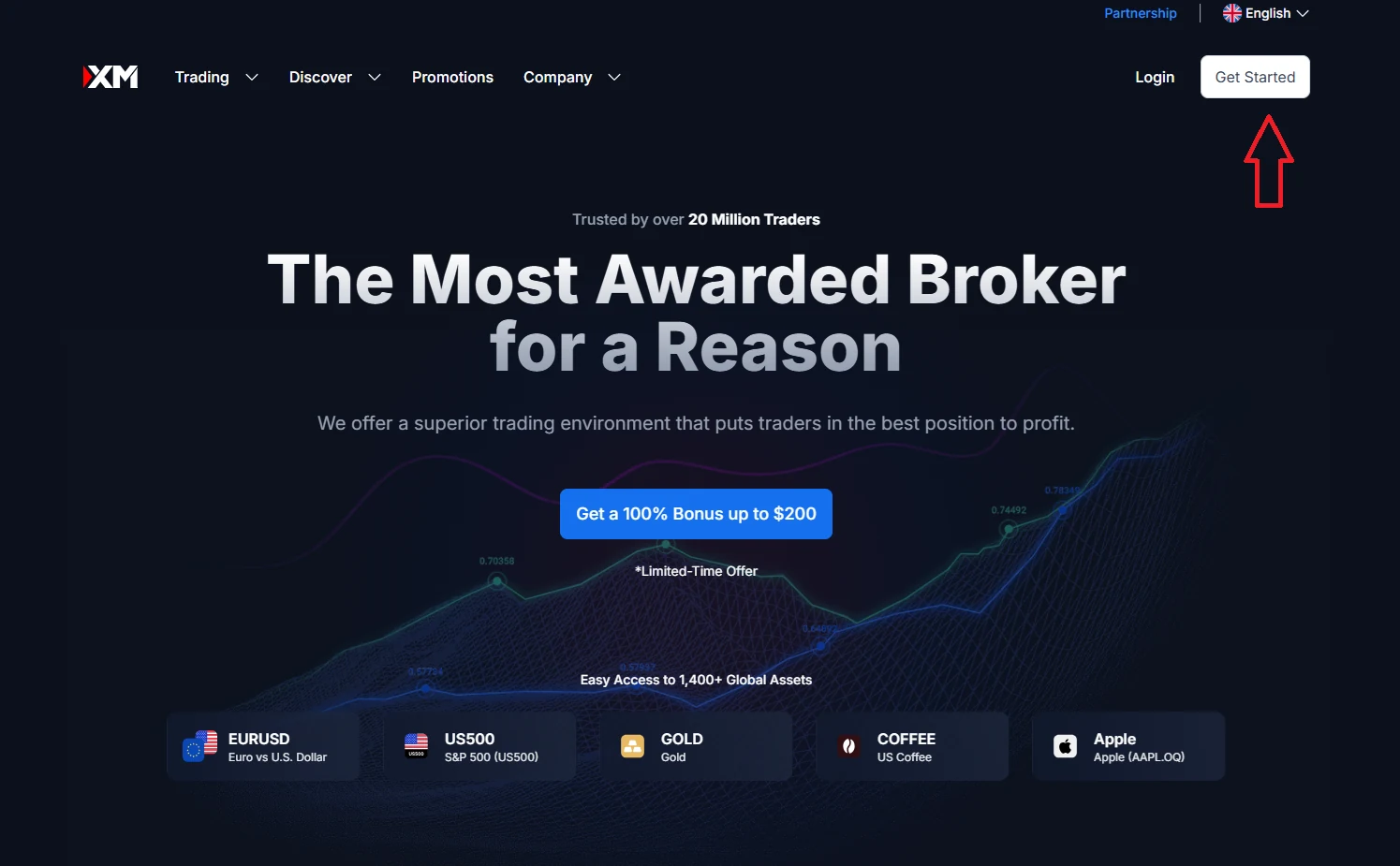
The form typically asks for:
- Country of residence — must match your proof of address
- Password
- Partner code (optional) —
FXTRDfor ForexTradeLab attribution - Marketing consent checkbox (optional to leave unticked)
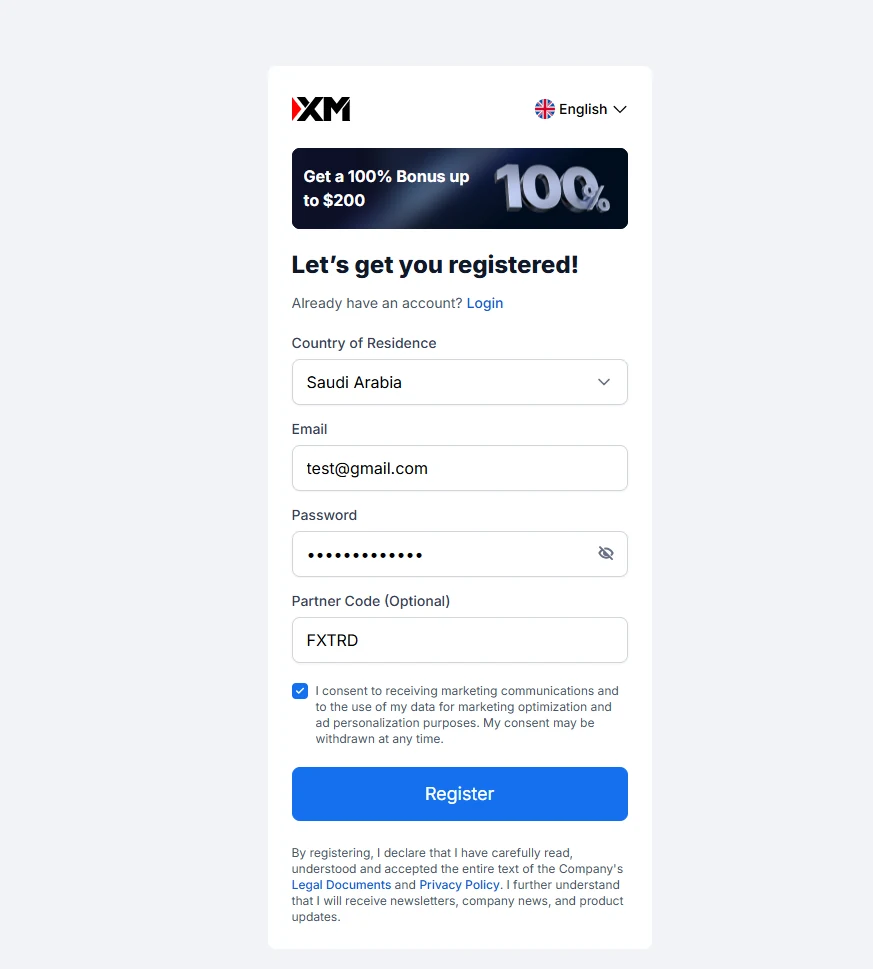
FXTRD if you want to attribute your account to ForexTradeLab — see our partner code guide.Field-level detail: How to register at XM in 5 minutes.
Third-party videos (independent creators)#
The clips below are from independent YouTube creators, not XM’s official channel. They may include promotions or steps that do not apply in your country; screens and forms change over time. Treat our written steps and XM’s live website as the source of truth.
Register walkthrough
Open account walkthrough
Example: You select your real residence country, use a unique password manager entry, type FXTRD, leave marketing unticked, and land in the Members Area within a minute of the confirmation email.
Common Mistake: Clicking a random “100% bonus” banner ad that clones the brand. Always check the domain and the licence register for the entity named in the agreement.
Professional Tip: Bookmark the confirmation email. Platform (MT4/MT5) passwords are often separate from the Members Area password.
Step 2: Choose Account Type#
Short Answer: Pick Micro if you are new; use Standard or Ultra Low only when you understand lot size and spread/commission trade-offs.
Detailed Explanation:
| Account (typical retail) | Why people choose it | Beginner fit |
|---|---|---|
| Micro | Small notional via micro lots; low entry deposit | Best default |
| Standard | Standard lot sizing conventions | OK after sizing literacy |
| Ultra Low | Tighter spreads / different cost structure | Better when you can read live costs |
Exact names and minima can vary by entity. Shares or other special account types may require much higher capital — do not assume every product starts at $5.
Deep dive: XM account types 2026 and XM Standard vs Ultra Low comparison.
Example: A $200 funded Micro account trading 0.01 on EUR/USD risks far less per pip than the same cash on an oversized Standard lot — the account type does not replace risk rules; lot size does. See 0.01 lot profit and loss explained.
Common Mistake: Choosing Ultra Low for “better spreads” then opening 0.10 lots on gold on day one.
Professional Tip: Decide max dollars you can lose on the first live session before you pick the account type. If you cannot state that number, stay on demo.
Step 3: Identity Verification (KYC)#
Short Answer: Upload a clear photo ID and a matching proof of address; approval is often within about 24 hours.
Detailed Explanation: Typical checklist:
- Colour scan or sharp photo of the full ID page
- Address document with name + address visible
- No glare, no cropped corners, no expired ID
- Same personal details as the registration profile
After approval, continue with what to do after XM account verification. Country-specific notes exist for some markets (for example Nigeria verification guides).
Example: A blurry WhatsApp photo of a folded ID fails; a flat desk photo in daylight with all four corners visible usually passes on the first try.
Common Mistake: Depositing a large amount before KYC is approved, then discovering a document mismatch freezes progress.
Professional Tip: Complete phone/SMS verification if the Members Area asks for it — some welcome tiles stay hidden until that step finishes (XM deposit bonus guide).
Step 4: Check Welcome / Deposit Bonus (If Shown)#
Short Answer: Open Bonus / Promotions in the Members Area and read the live tile — do not assume automatic credit.
Detailed Explanation: XM welcome messaging in 2026 is best treated as country-based:
- Selected countries may see a $100 path that can require qualifying funding
- Other eligible regions may still see a $30 no-deposit / welcome credit
- Restricted profiles (commonly including many EU/UK/US/Canada paths) may see no retail CFD welcome bonus
The bonus credit itself is usually not withdrawable. Eligible profits may be withdrawable only after volume and campaign rules. Full mechanics: XM deposit bonus 2026 and Forex no-deposit bonus 2026.
Example: After KYC, your tile shows a $30 credit with a 14-day window and a volume clause. You screenshot the terms, trade micro lots, and only then consider adding personal funds.
Common Mistake: Believing “after verification the bonus is automatic” — that sentence is outdated for many entities.
Professional Tip: If funding is required for your tile, stop calling it a no-deposit bonus. Labels drive expectations and risk.
Step 5: Make Your First Deposit#
Short Answer: Fund with a small test amount via a method you can also use for withdrawal, after KYC is clean.
Detailed Explanation: Common rails (availability is regional): cards, bank wire, e-wallets such as Skrill/Neteller, and local methods. Practical habit:
- Deposit a small amount first
- Confirm it appears in the correct trading account
- Later run a first withdrawal test before scaling
Base currency choice (USD/EUR/GBP, etc.) affects conversion friction — see XM account base currency guide and XM deposit methods by country.
Example: You deposit $50 by card on Micro, verify the balance, and refuse to add more until one micro-lot session with a stop-loss feels mechanical.
Common Mistake: Funding $2,000 on day one because a YouTube thumbnail promised fast doubling.
Professional Tip: Prefer the same rail for deposit and withdrawal when the broker’s rules allow it — mismatched rails create the most support tickets.
Step 6: Download the Platform and Place a First Trade#
Short Answer: Install MT4 or MT5, log in with platform credentials from XM, trade 0.01 with a stop-loss.
Detailed Explanation: XM supports MetaTrader 4, MetaTrader 5, and often WebTrader / mobile apps. Platform passwords are emailed separately from Members Area login.
Safe first-trade sequence:
- Pick a liquid symbol (many beginners start with EUR/USD; gold is more volatile)
- Set volume to 0.01 (or the smallest available)
- Set stop-loss before clicking buy/sell
- Optional take-profit — never skip the stop
- Journal the trade even if it is tiny
Platform pillars: MetaTrader 4 guide, MetaTrader 5 guide, MT4 vs MT5. Risk framing: forex risk management and one-percent risk rule examples.
Example: EUR/USD, 0.01 lot, stop 15 pips, risk measured in dollars before entry. You close the platform after one planned trade instead of “revenge clicking.”
Common Mistake: Opening the first live trade during a major news spike without reading the calendar.
Professional Tip: If you cannot explain the trade in one sentence from your written plan, you are not ready for live size — stay on demo.
Education-first next step: practise on demo, calculate your risk per trade, then review the current XM account, bonus and withdrawal terms before opening or funding a live account. Check XM terms only after you understand the risks; eligibility depends on your country, legal entity and live campaign rules.
Checklist — Open XM Without Avoidable Friction#
- ID and proof of address ready and matching the selected country
- Official domain / entity name noted from the client agreement
- Strong unique password + email access confirmed
- Optional
FXTRDentered only if you intend attribution - KYC uploaded in colour before large deposits
- Account type chosen with a max-loss number in dollars
- Live bonus tile read (or confirmed absent) before claiming
- Deposit method matches planned withdrawal path
- MT4/MT5 credentials saved; first trade sized at micro lot with stop-loss
- Demo practice completed if you are new to order tickets
Glossary#
| Term | Meaning |
|---|---|
| KYC | Know Your Customer — identity and address verification |
| Members Area / My XM | Web portal for documents, funding, bonuses and account settings |
| Micro account | Account type geared to micro-lot sizing and low entry deposits |
| Ultra Low | Account type marketed around tighter spread/commission structure |
| Partner code | Optional referral/IB code (e.g. FXTRD) entered at signup |
| Welcome tile | Live promotion card in Members Area; country/entity-specific |
| Legal entity | The regulated company named in your client agreement |
Key Takeaways#
- Opening XM is mostly document matching + entity routing, not a secret form trick
- Micro + 0.01 + stop-loss is the responsible first live path for most beginners
- Bonuses are conditional; the Members Area beats any blog headline
- Screenshot terms on claim day; campaigns change
- Scale only after a clean small deposit and a clean small withdrawal test
Related Reading#
- How to open an XM account — fast answer
- How to register at XM in 5 minutes
- XM partner code registration guide
- XM deposit bonus 2026
- What to do after XM verification
- Open forex trading account checklist
- How to start forex trading
- How to open an Exness account
- XM vs Exness
- How to switch forex brokers
Next step: If your process is ready, review XM’s current terms for your country, complete KYC, and fund only capital you can afford to lose under a written risk rule.
Comments 2
Followed this guide step by step and had my account verified within 24 hours. The only hiccup was the address verification — my utility bill was in my landlord's name, so I had to use a bank statement instead. Maybe add a note about what to do if your utility bills are not in your own name.
One update needed: the screenshots in the guide show a slightly older version of the XM registration page. The current layout has the account type selection on a different step than shown here. The process is the same but the visual mismatch might confuse first-time users who are following along screen by screen.
Add a useful note for other traders. We review comments before publishing.