
- XM's live registration form has only four required inputs — country, email, password, marketing-consent checkbox — plus one optional partner code field
- The partner code field accepts FXTRD if you want to attribute the account to ForexTradeLab; leaving it blank does not block registration
- The country you select must match the address on your KYC documents — XM rejects mismatches at the verification stage
- Clicking Register sends a verification email and lands you in the My XM area, where the platform asks for ID and proof of address before funding
- This guide covers only the signup form; for KYC, deposit and first trade see our step-by-step account opening guide

July 2026 XM consistency note: XM details can vary by country and legal entity. Current official XM pages list 8 group licenses, 1,400+ global assets, MT5/WebTrader/app access, and public promotions such as Refer a Friend and monthly competitions; welcome/deposit bonus tiles must be verified inside the live XM Members Area because eligibility depends on country, entity, KYC status and account type.
What this guide is — and is not#
Detailed Explanation
XM's live registration form has only four required inputs — country, email, password, marketing-consent checkbox — plus one optional partner code field The partner code field accepts FXTRD if you want to attribute the account to ForexTradeLab; leaving it blank does not block registration.
Example
For example, use the article's figures and comparison criteria as a worked scenario, then replace them with the current terms, prices, and limits that apply to your account or market.
Short Answer
The form itself is three to five minutes for most users — five inputs, one of which is optional. The longer wait comes after submission: the verification email lands in under a minute, but KYC document review typically takes up to 24 hours.
Common Mistake
Choosing, ranking, or funding a broker from a headline number without confirming the current legal entity, account type, total cost, eligibility rules, and withdrawal terms.
Professional Tip
Save the dated official terms and regulator entry for the entity that would hold your account, then verify the same details in the live onboarding flow before depositing.
This is the signup form only. We open the live XM registration page, fill each field, and stop the moment XM acknowledges the account exists. Verification, deposit and the first trade are deliberately out of scope — they live in the longer XM account opening step-by-step guide, and the partner code mechanics get their own dedicated page.
Use this page if you already know XM is the broker you want and just need the fastest, error-free path through the form.
Before you click anything (60 seconds of prep)#
Have these ready in another tab or on your phone before you start. Trying to find them mid-form is the single biggest reason people abandon signup:
- Government ID (national ID, passport, or driver's licence) — needed at verification, not now, but confirm yours is unexpired
- Proof of address issued in the same country you will select on the form (utility bill, bank statement, internet bill — dated within 3-6 months)
- An email you actually check — XM sends platform credentials and KYC requests there
- A new password you have not reused on another broker — 12+ characters with mixed case and digits
- The partner code FXTRD if you want to attribute the account to ForexTradeLab (optional)
That is everything. The form itself takes most users between three and five minutes.
Step 1 — Click Get Started on xm.com#
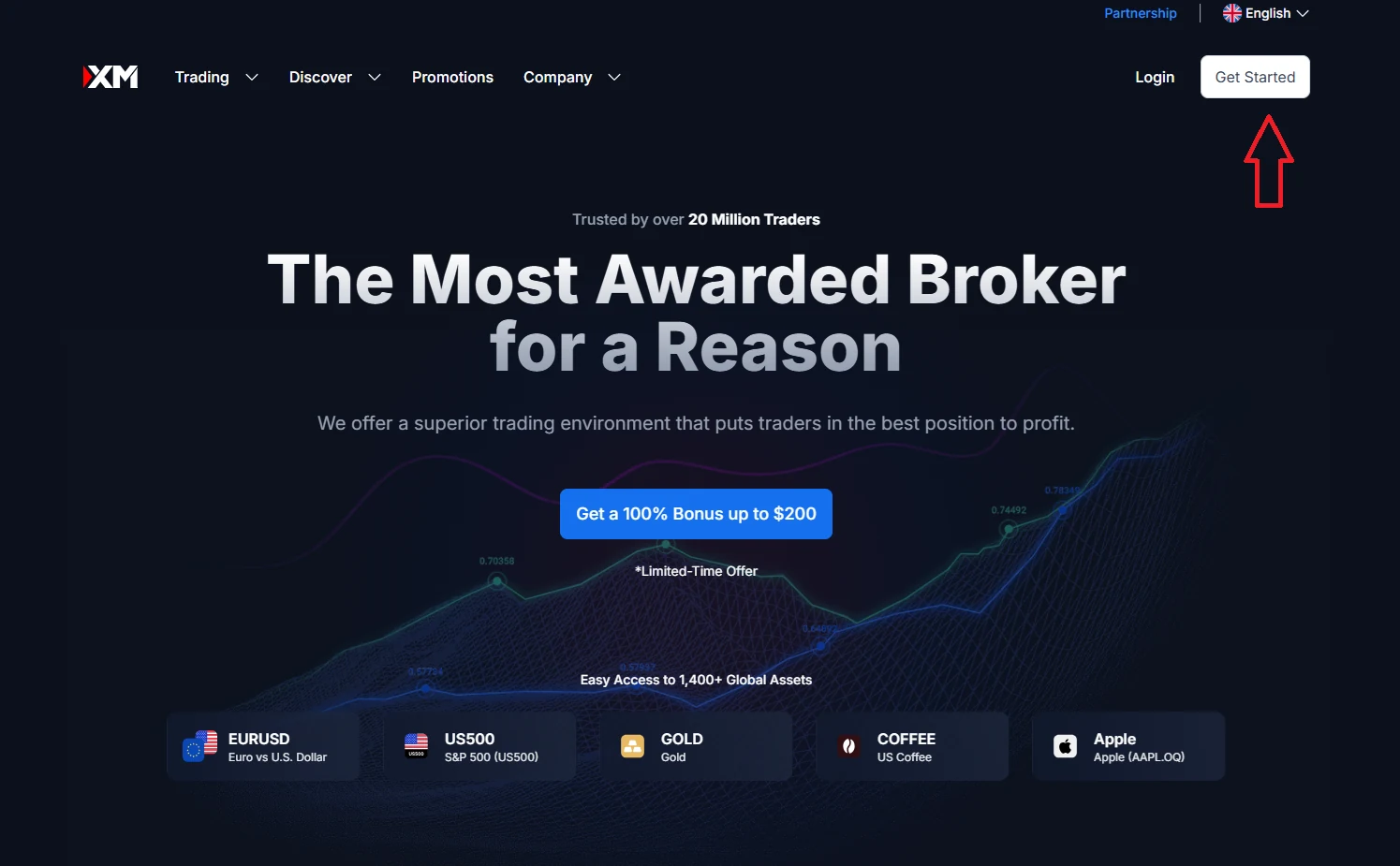
The button label can read Get Started, Open Account or Register depending on the page version XM is testing in your region. They all route to the same form. Avoid clicking promotional banners ("Get a 100% Bonus up to $200") — those open marketing pages first and force an extra click.
Step 2 — The form, field by field#
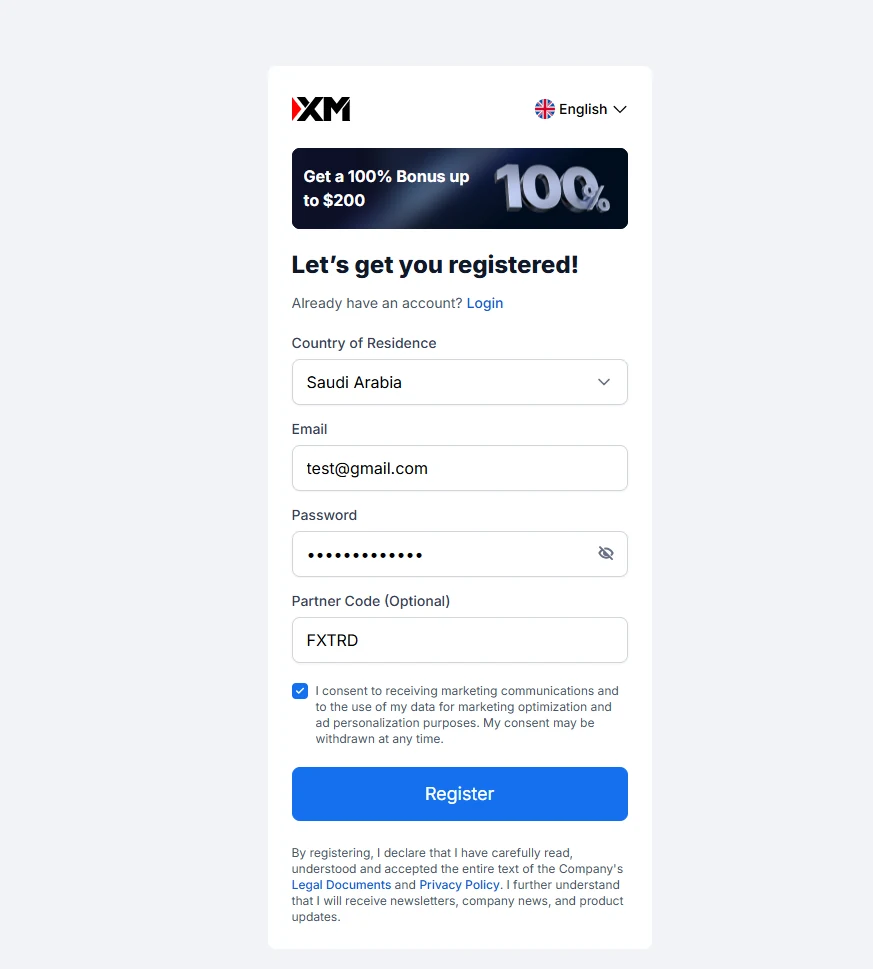
Country of Residence#
XM uses this field to route your account to the correct legal entity (for example CySEC, DFSA, FSCA, FSC/FSA or another eligible group entity), which decides your leverage cap, bonus eligibility and dispute-resolution path. It is not a cosmetic choice.
Select the country whose ID and proof-of-address documents you can actually upload at verification. If your passport says one country and your utility bill says another, choose the country of the utility bill — XM's KYC desk weights proof of address heavier than ID for residence checks.
Email#
Use a personal email you check daily. XM sends:
- The verification link (within minutes)
- Your MetaTrader 4 / 5 platform credentials (separate from the My XM password you set on this form)
- Every KYC follow-up
- Withdrawal status updates
Disposable or alias emails work for signup but routinely break later password resets. If you must use an alias, point it at a real inbox you control.
Password#
This becomes your My XM members area login, not your trading platform login. XM issues the MT4/MT5 trading password separately by email after verification.
Aim for 12+ characters, mixed case, at least one digit. Do not reuse a password from another broker — if any retail broker leaks credentials, attackers spray-test them across competitors within hours.
Partner Code (Optional)#
This is the field where you can enter FXTRD if you want to register through ForexTradeLab's partner attribution. Three things to know:
- The field is optional; leaving it blank still creates a valid account
- Entering FXTRD does not change your spreads, commissions, leverage, bonus eligibility or trading conditions in any way — XM's published terms still apply
- The label varies by region: you may see Partner Code, IB Code, Affiliate Code or Referral Code. They are the same field
Full partner-code mechanics, including what happens if your region's form does not display the field at all, are covered in our XM partner code guide.
Marketing-consent checkbox#
The form ships with the marketing checkbox pre-ticked in most regions. Leaving it ticked means promotional emails about bonuses, webinars and new instruments. Untick it if you prefer a quieter inbox — it has zero effect on account creation, bonus eligibility or trading conditions.
Step 3 — Click Register#
The form validates client-side, so any field error (wrong email format, too-short password, country not matching XM's allowlist for that domain) shows immediately. Common rejection: a country selection where XM does not currently accept clients — the dropdown still lists every country, but submission fails.
The instant you click Register, three things happen:
- XM creates a "demo-eligible" account skeleton with a unique account number
- A verification email lands in the inbox you provided (check spam if it does not arrive in 60 seconds)
- You land in the My XM members area, which immediately prompts you to upload ID and proof of address
You are technically registered. You cannot fund or trade live yet — that needs verification — but the partner-code attribution is already locked in if you entered FXTRD.
What happens next (in two sentences)#
Verification asks for the documents you prepared in the prep step and usually completes within 24 hours. Once verified, the welcome deposit bonus (where eligible) is auto-credited and you can move to deposit, platform download and the first trade — all detailed in the longer step-by-step account opening guide. That longer page is the canonical XM opening walkthrough; this page is the form-only slice. If you wanted Exness instead, switch to how to open an Exness account.
Common signup mistakes that delay verification#
- Country mismatch with proof of address. The single most-rejected case at KYC. Pick the country of your utility bill, not your passport, if they differ.
- Email typo. XM does not display the email you typed back to you for confirmation. A typo means you never receive credentials and have to email support to recover the account.
- Re-using a broker password. Not a verification blocker, but a real security risk — credential-stuffing attacks are documented across the retail-broker industry.
- Pasting FXTRD into a non-partner field. The partner code only goes in the field labelled Partner Code (or its regional equivalent). Pasting it into Email or Password breaks signup.
- Selecting a country XM does not serve. The dropdown shows every country; the restricted-country list is what actually governs eligibility.
Before registering: review XM's current country, entity, bonus and withdrawal terms, then decide whether partner code FXTRD should attribute the account to ForexTradeLab. Check the live XM form only after confirming that the account type and risk disclosures fit your situation.
Affiliate disclosure: ForexTradeLab may earn a commission if you use a tracked broker link. This does not increase our rating or replace your own due diligence. Review the affiliate disclosure and verify current entity-specific terms before opening or funding an account.
Risk warning: CFDs are complex instruments and carry a high risk of losing money rapidly due to leverage. Most retail investor accounts lose money when trading CFDs. Consider whether you understand how CFDs work and whether you can afford to take the high risk of losing your money. This page is not investment, tax or legal advice; read XM's legal documents and confirm regional eligibility on the live signup form before opening an account.

Comments 3
Verification took me about 20 minutes, not the 'few minutes' mentioned. Had to re-upload my ID because the first photo was slightly blurry. Tip for others: use a flat surface with good lighting and make sure all four corners of your document are visible in the frame.
The step about selecting your entity (XM Global vs. XM Cyprus vs. XM Australia) is more important than most beginners realize. Which entity you register under determines your maximum leverage, bonus eligibility, and even available payment methods. I wish I'd understood that before defaulting to the first option.
This is the kind of content that separates serious trading education from the noise. Bookmarked and will revisit. The risk reminder is what makes it useful. That detail makes the guide feel more practical.
Add a useful note for other traders. We review comments before publishing.