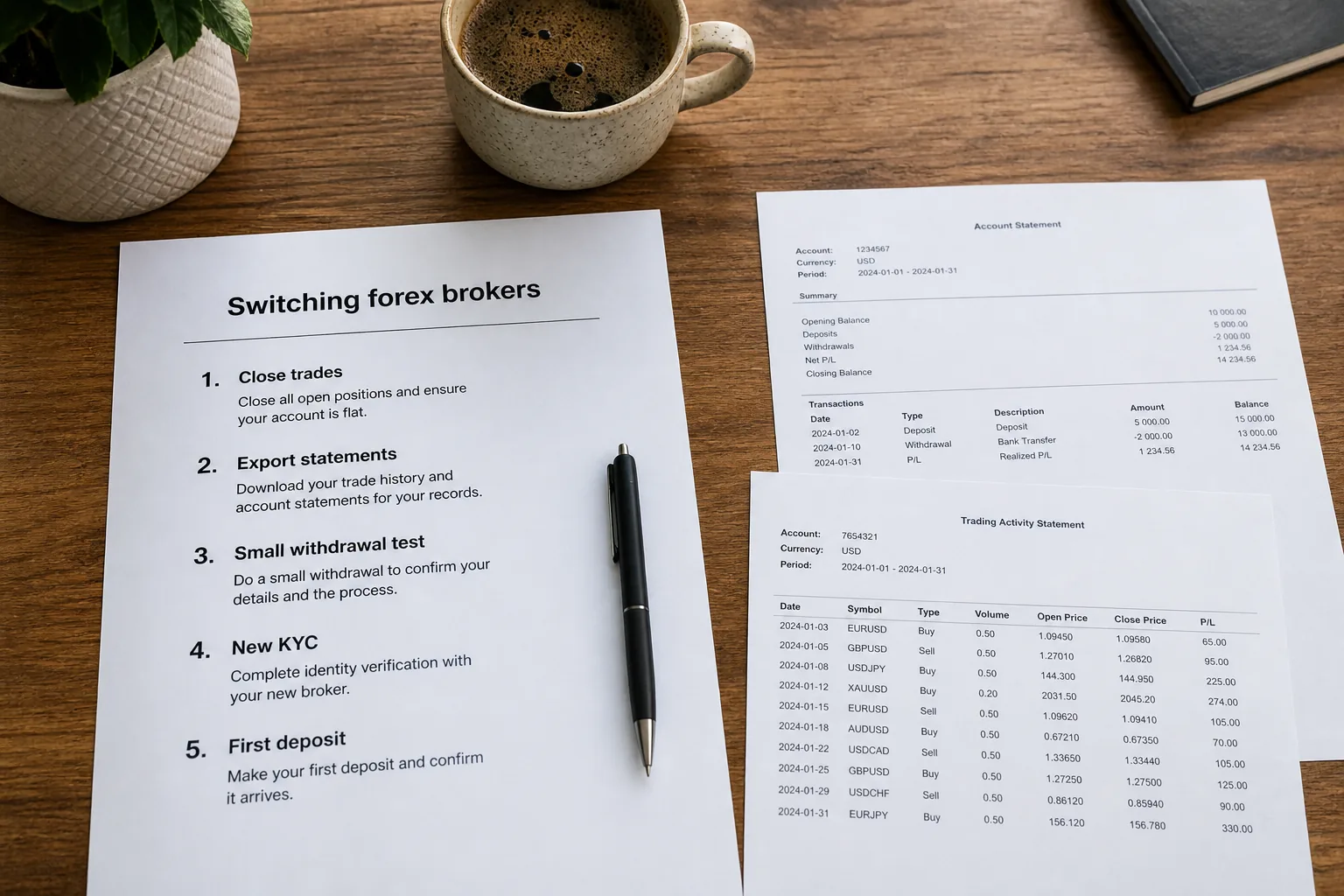
- Open CFD trades do not move with you — close or hedge on the old broker, then reopen only after the new account is verified
- Complete KYC and a small withdrawal test on the new broker before emptying the old one
- Bonus credit is usually not cash; withdrawing while volume is unfinished can cancel credit and related profit
- Export MT4/MT5 statements and tax records before you lose portal access
- Do not run the same EA on two live accounts at once — that doubles spread and correlated risk
- If the destination is XM or Exness, use the matching opening walkthrough after [XM vs Exness](/blog/xm-vs-exness/)

August 2026 field note: This page is for traders who already have a live account and want to change provider. It is not a first-account tutorial. Legal entity, bonus, leverage and payment rails still differ by country. Confirm live client-area terms before you move capital.
Affiliate & risk disclosure: ForexTradeLab may earn commissions if you open an account via our links. This guide is educational, not personalised advice. CFDs can cause rapid losses. See the disclaimer and affiliate disclosure.
If you have not opened any live account yet, use the open-account checklist instead of this migration sequence.
Short Answer#
You cannot transfer open CFDs, trade history or bonus credit to another broker. Switch by verifying the new firm first, testing a small withdrawal, then closing and withdrawing the old account. Skipping that order is how experienced traders lose money during a “simple” move.
Who This Article Is For#
Short Answer
Active or recently active retail traders who dislike their current broker’s payouts, costs, entity or platform — not people hunting a new hobby.
Detailed Explanation
Typical switch triggers:
- Withdrawals that stall, get trimmed, or always need “one more document”
- All-in cost (spread + commission + slippage) worse than a tested alternative
- EA or VPS friction: symbol suffix, min lot, stop level, server downtime
- Bonus lock: you cannot withdraw cash without burning credit
- Entity or country mismatch after a residence change
- You already compared XM vs Exness and want an operations plan, not another review
A losing streak is not by itself a reason to switch. Changing broker does not repair position size.
Example
You scalp gold on Broker A. Spreads jump 4 points around US CPI and a withdrawal sat three extra days after KYC was “done.” You open Broker B, pass KYC, deposit $50, withdraw $20, then close gold on A during London and pull the rest. That is a switch. Closing gold on Friday night and wiring everything to an unverified new login is not.
Common Mistake
Opening the new account and copying every live trade across the same afternoon. You pay two spreads and still have correlated risk if one fill is late.
Professional Tip
Write one sentence: “I am leaving because of X, measured by Y.” If you cannot name X, stay and journal costs for two weeks.
Why Positions Do Not Transfer#
Short Answer
A retail forex/CFD trade is a bilateral contract with your current firm. The next broker is a different counterparty.
Detailed Explanation
Listed futures can sometimes be transferred through a clearing house. Retail CFDs generally cannot. ESMA’s CFD measures and the FCA’s retail CFD warnings describe product and protection rules per firm and entity, not a portable position book.
What stays behind:
- Open and pending orders
- Server-side trade history
- Promotional credit
- IB/partner attribution on the old profile
What you can take:
- Exported statements
- Your strategy rules, journal and EA files (settings must be re-checked)
- Proof of deposits and withdrawals for tax or disputes
Example
A 0.20 lot EUR/USD long on Broker A does not become a 0.20 lot on Broker B. You close A at A’s bid, then — if the setup still exists — buy B at B’s ask. The round-turn cost of the move is real.
Common Mistake
Leaving a “small” hedge open on A “until B is ready,” then forgetting it over a weekend. Weekend gaps are a separate risk; see forex weekend gap risk.
Professional Tip
If a swing position is core, either accept the close or delay the switch until that thesis is done. Do not migrate mid-thesis unless payout risk on A is already unacceptable.
The Safe Switch Sequence#
Short Answer
New broker works first. Old broker empties second. Never the reverse.
Detailed Explanation
| Step | Action | Pass rule |
|---|---|---|
| 1 | Write the switch reason and destination entity | You can name regulator + company on the new client agreement |
| 2 | Export old statements, bonus PDF, KYC status | Files saved off-platform |
| 3 | Register and complete KYC on the new broker | Approved identity and address |
| 4 | Small deposit, own-name method | Funds visible; receipt saved |
| 5 | Small withdrawal test | Cash arrives; fees and times logged — Withdrawal Proof Protocol |
| 6 | Demo or micro live on new symbols | Contract size, stops and suffix confirmed |
| 7 | Close old risk in a liquid session | No forgotten pendings; swap/bonus rules read |
| 8 | Full withdrawal from old account | Same-method rules followed |
| 9 | Size up only on the new book | One live copy of each strategy |
If step 5 fails, stop. You still have Broker A. That is the point of the order.
Example
Day 1–2: KYC on the destination. Day 3: $30 in, $15 out. Day 4: one 0.01 test trade. Day 5: flatten Broker A and request payout. Traders who invert this spend a week with capital in limbo.
Common Mistake
Requesting the full old withdrawal on Monday and only starting new KYC on Tuesday. Document queues and name-match issues then leave you flat with no venue.
Professional Tip
Keep a minimum residual on A until B’s first withdrawal has landed — unless A is already blocking payouts, in which case document everything and do not add funds to A.
Bonus Locks, Same-Name Payments and Old-Account Traps#
Short Answer
Treat leftover credit as non-cash. Treat the deposit method as the default withdrawal rail.
Detailed Explanation
Promotional credit is usually margin, not a balance you can wire out. Withdrawing while volume is unfinished often cancels credit and can claw related profit. If you are leaving because of a bonus, read the live terms once more and decide: finish volume on small size, forfeit credit, or split a permitted cash portion. XM-specific delays are covered in XM withdrawal problems. Campaign mechanics: forex welcome bonus brokers.
Old-account payment rules that stall experienced traders:
- Third-party cards or wallets
- Crypto in / bank out without following the broker’s matching policy
- Chargebacks on the original deposit
- Open trades or pending bonuses that freeze “available to withdraw”
Example
You have $800 cash and $400 credit. A 50% equity withdrawal may remove a large share of the credit. If the reason for switching is execution, it can still be rational to forfeit credit rather than overtrade to “free” it.
Common Mistake
Opening the new broker only to claim another welcome bonus while the first campaign is active. Two bonus books, two volume clocks, one brain.
Professional Tip
If the destination is Exness, do not expect an XM-style welcome credit as a default global campaign. If the destination is XM, confirm the live Members Area tile — not a screenshot from 2024. Opening paths: XM step-by-step and Exness step-by-step.
Moving EAs, VPS and Symbol Specs#
Short Answer
Copy the .ex4/.ex5 and set files, then rebuild the chart on the new server. Never attach the same live EA to two accounts as a “transition.”
Detailed Explanation
What usually breaks on day one at the new broker:
- Symbol name:
XAUUSDvsGOLDvsXAUUSDm - Contract size and tick value (gold and indices especially)
- Minimum stop distance
- Filling mode (FOK vs IOC vs return)
- Commission model on Raw/Zero vs spread-only
- Swap or swap-free mapping
Test on demo of the same entity you will fund, then one micro live order. VPS: point the terminal at the new server; do not run two live terminals on one strategy “just in case.”
Example
An EA that traded 0.10 lots on Broker A’s gold (100 oz contract) may be oversized on a cent or mini spec — or undersized on a 100 oz spec if you assumed cents. Read Specification on the new Market Watch before autotrading.
Common Mistake
Changing broker, VPS region and EA build on the same night. You will not know which change caused the fill quality.
Professional Tip
Keep a one-page spec sheet: symbol, contract size, tick value, min volume, stop level, commission per lot. Update it when you switch. Use position size math on the new tick value, not the old one.
XM or Exness as the Destination#
Short Answer
Pick by entity, cost, payout workflow and whether you need credit — then open with the matching HowTo. Do not open both live and clone the book.
Detailed Explanation
| If you are switching because… | Often compare first |
|---|---|
| You want eligible welcome/deposit credit and a $5-style Micro path | XM opening guide after XM vs Exness |
| You want spread-only Standard from $10 and a fast payout workflow | Exness opening guide |
| You still have not measured all-in cost | Stay on the old broker two weeks with a cost journal, or demo both |
| Country eligibility is unclear | XM restricted countries and Exness restricted countries |
Account-type refresher for the new book: best XM account for beginners is still useful if you downsize; best Exness account for beginners if you land on Standard rather than Raw on day one.
Example
A scalper leaving a raw-spread shop for XM Ultra Low must re-measure London gold — not assume “regulated = tighter.” A swing trader leaving a slow-payout shop for Exness still needs WPP on their payment tile.
Common Mistake
Choosing the destination from a YouTuber’s affiliate link without reading the legal entity on the signup screen.
Professional Tip
If IC Markets (or another execution-first name) is the current broker, compare live all-in cost; do not assume the next brand is automatically cheaper. Use XM vs Exness vs IC Markets only as a map, then test.
Switch Checklist#
- Switch reason is operational, not last week’s P&L
- Old statements and bonus terms exported
- New country eligibility and entity confirmed
- New KYC approved
- Own-name payment method on the new account
- Small withdrawal has arrived (WPP)
- New symbol specs checked
- Old pendings and EAs disabled
- Old account flattened in a liquid session
- Full old withdrawal requested under same-method rules
- Only one live copy of each strategy remains
Common Switch Failures#
- Transferring “the account” as if it were a listed futures book
- Emptying A before B can pay
- Bonus overtrading to unlock credit
- Dual live EAs
- Skipping statement export
- Migrating on Friday close into a weekend gap
- Using a friend’s card on the new profile
Key Takeaways#
- Contracts stay with the old firm. You move cash and process, not positions.
- Prove the new payout loop before you depend on it.
- Credit is not cash. Read campaign terms once more.
- Specs and suffixes change. Rebuild the EA, do not paste it.
- After the destination is chosen, use the XM or Exness walkthrough — not a random signup ad.
Related Reading#
- First withdrawal test before you scale
- Open a forex account checklist
- How to choose a reliable forex broker
- XM vs Exness
- How to open an XM account
- How to open an Exness account
- XM withdrawal problems
- Exness deposit
- Exness KYC
- Forex weekend gap risk
Future related articles#
- Moving an EA and VPS to a new broker (server, suffix, tick value)
- When a bonus lock is a valid reason to leave — and when it is overtrading
- Switching after a change of residence and entity remapping
Practical next step: if the destination is already chosen, complete KYC there and run a small withdrawal test before emptying the old account. Compare XM vs Exness if you have not. Then use the matching walkthrough for XM or Exness. Fund only capital you can afford to lose.
Comments
Add a useful note for other traders. We review comments before publishing.