
- Volet Wallet (Volet.com) is the newest deposit and withdrawal method now shown on XM Global for eligible clients
- Existing methods still apply: Credit/Debit Cards, Visa/Mastercard, Binance Pay, Cryptocurrencies and Online Bank Transfer
- Pick a method in your own name and prefer one you can also withdraw through
- Always verify the live tile list in your Members Area — payment options vary by country and XM entity
- Quick Answer
- Short Answer
- Detailed Explanation
- Example
- Common Mistake
- Professional Tip
- What’s New: Volet Wallet on XM Global
- Available Methods on XM Global (Current Grid)
- How to Deposit with Volet Wallet
- How to Withdraw to Volet Wallet
- Existing Methods Still Matter
- Practical Checklist Before You Send Money
- Related Guides
July 2026 update: XM Global has opened Volet Wallet (Volet.com) for deposits and withdrawals for eligible clients. Existing methods (cards, Binance Pay, crypto, bank transfer) remain in place where your country supports them. Always confirm the live list in your Members Area.
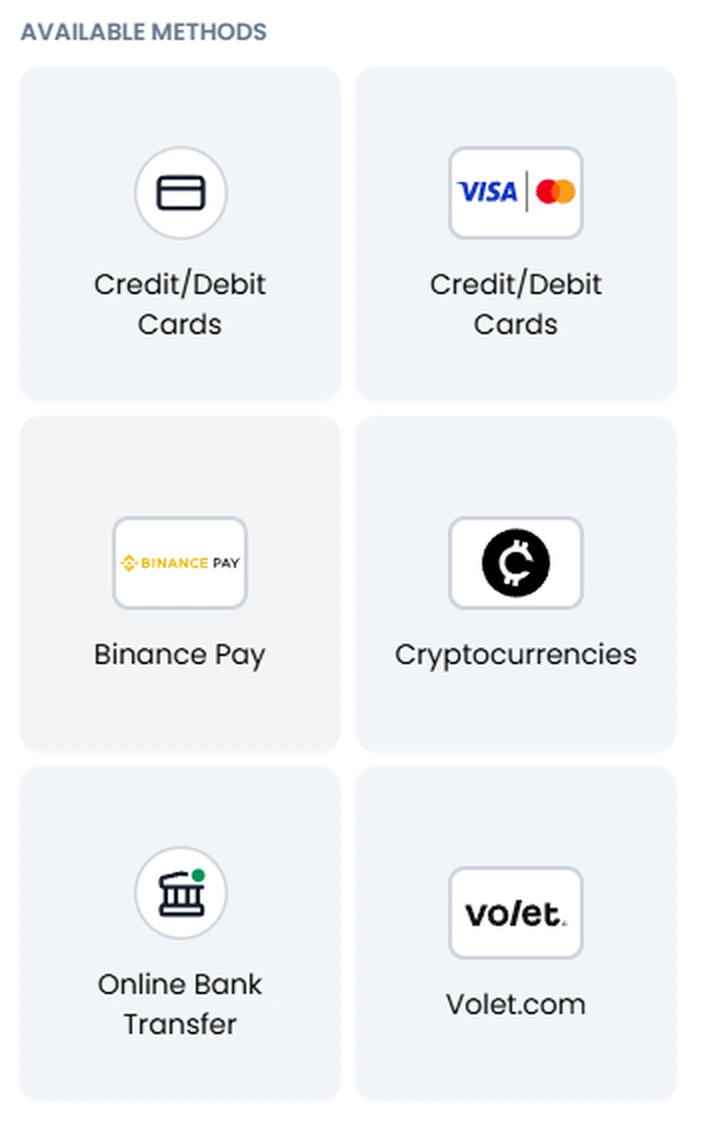
What’s new: Volet Wallet deposits and withdrawals are now live on XM Global! 🎉 The Volet.com tile is the fresh addition in the Available Methods screen — a new e-wallet route next to the methods traders already use.
Quick Answer#
Short Answer
XM Global has opened Volet Wallet (Volet.com) for deposits and withdrawals for eligible clients. It appears as a new tile under Available Methods next to cards, Binance Pay, cryptocurrencies and online bank transfer. Confirm it in your Members Area before funding.
Detailed Explanation
Volet Wallet (Volet.com) is the newest deposit and withdrawal method now shown on XM Global for eligible clients Existing methods still apply: Credit/Debit Cards, Visa/Mastercard, Binance Pay, Cryptocurrencies and Online Bank Transfer.
Example
For example, use the article's figures and comparison criteria as a worked scenario, then replace them with the current terms, prices, and limits that apply to your account or market.
Common Mistake
Treating an illustrative figure, ranking, broker term, or market observation as a guarantee or as current for every country, legal entity, account, and trading session.
Professional Tip
Verify the latest primary source, legal-entity terms, fee schedule, and platform specifications before funding an account or placing a trade.
XM Global now supports Volet.com (Volet Wallet) for both deposit and withdrawal on eligible accounts. In the Members Area funding screen you should see the familiar grid — and at the bottom, the new Volet.com option. Use it only if the tile appears for your country; payment availability is never global by default.
For broader funding rules, see our XM minimum deposit & withdrawal guide and the 5-minute deposit checklist.
What’s New: Volet Wallet on XM Global#
Volet.com (also called Volet Wallet) is an e-wallet / digital payments brand (formerly AdvCash). On XM Global it now appears as a dedicated payment tile for:
- Deposits into your XM trading account
- Withdrawals back to the same Volet wallet (subject to XM’s same-method rules)
Why this matters for traders:
- Another fast e-wallet-style route when cards or local banks are slow or blocked
- Useful if you already hold a verified Volet account
- Sits alongside — not instead of — the methods you already know
Availability caveat: Seeing Volet in screenshots or marketing does not guarantee it appears on every XM Global account. Country, legal entity and KYC status decide the live tile list. If Volet.com is missing for you, use another method shown in your Members Area.
Available Methods on XM Global (Current Grid)#
Based on the current Available Methods screen for eligible XM Global clients:
| Method | Status | Typical use |
|---|---|---|
| Credit/Debit Cards | Existing | Small first deposits, everyday funding |
| Visa / Mastercard | Existing | Card rails via Visa or Mastercard |
| Binance Pay | Existing | Traders who already use Binance |
| Cryptocurrencies | Existing | Crypto funding where enabled |
| Online Bank Transfer | Existing | Larger amounts, bank-linked transfers |
| Volet.com (Volet Wallet) | New | Fresh e-wallet deposit & withdrawal option |
The first five options above are the established rails traders already rely on. Volet.com is the newcomer — freshly enabled for deposit and withdrawal on XM Global where your entity supports it.
How to Deposit with Volet Wallet#
- Complete XM account verification (ID + proof of address).
- Open or verify your Volet.com wallet in your own name (must match KYC).
- Log in to the XM Global Members Area → Deposit.
- Select the trading account you want to fund.
- Choose Volet.com from Available Methods (only if listed).
- Enter the amount (XM’s account minimum is typically $5 — your payment provider may set a higher practical floor).
- Approve the payment in the Volet window and wait for the balance to credit.
- Save the confirmation receipt (screenshot or PDF).
How to Withdraw to Volet Wallet#
- Members Area → Withdrawal.
- Select the account and choose Volet.com if you deposited via Volet (or if XM allows that route for your profits).
- Enter the amount and confirm.
- XM typically processes requests within business-day windows; e-wallet arrival can be same day once approved, but third-party timing still applies.
Same-method rule: XM normally returns funds to the same method used for deposit, up to the deposited amount. If you plan to withdraw to Volet, prefer depositing with Volet first.
Existing Methods Still Matter#
Do not ignore the older rails just because Volet is new:
- Cards (Visa/Mastercard) — still the simplest path for many beginners
- Binance Pay — still strong if your capital already sits on Binance
- Cryptocurrencies — still relevant where XM shows a crypto tile
- Online Bank Transfer — still preferred for larger, bank-native transfers
Pick the method that is listed for you, in your name, and usable for withdrawal later. That beats chasing every new logo.
Practical Checklist Before You Send Money#
| Check | Why |
|---|---|
| Tile visible in Members Area? | Only live tiles work for your account |
| Name matches KYC? | Third-party wallets/cards get held |
| Small test first? | Confirm speed and conversion before large amounts |
| Withdrawal path clear? | Same-method rule reduces friction later |
| Receipt saved? | Needed if support must trace a transfer |
Related Guides#
- XM deposit methods by country
- XM minimum deposit & withdrawal
- XM deposit quick guide
- XM USDT / crypto funding paths
- What is XM broker review
Ready to check your methods? Open your XM Global Members Area and confirm whether the new Volet.com tile appears for your country — then fund with a method you can also withdraw through.
Affiliate disclosure: ForexTradeLab may earn a commission if you use a tracked broker link. This does not increase our rating or replace your own due diligence. Review the affiliate disclosure and verify current entity-specific terms before opening or funding an account.
Comments
Add a useful note for other traders. We review comments before publishing.