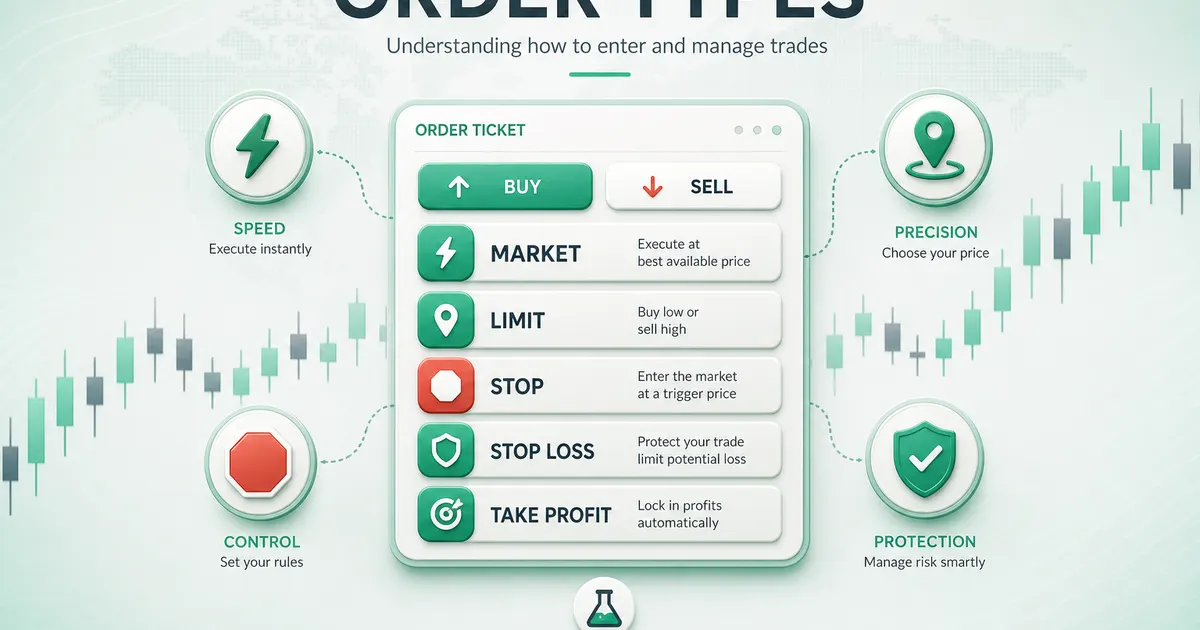
- Market orders prioritize execution speed, not exact price
- Limit orders prioritize price control, but may never fill
- Stop orders are useful for breakouts and stop losses, but can slip in fast markets
- Stop loss and take profit orders should be planned before entry, not after emotions rise

Quick Answer#
The main forex order types are market orders, limit orders, stop orders, stop-limit orders, stop loss orders, and take profit orders.
Each one answers a different question:
| Question | Best matching order |
|---|---|
| Do I need to enter or exit immediately? | Market order |
| Do I only want this price or better? | Limit order |
| Do I want to trade only if price breaks a level? | Stop order |
| Do I want to define maximum planned loss? | Stop loss |
| Do I want to lock a target automatically? | Take profit |
Order types are not just platform buttons. They decide whether you are prioritizing speed, price control, breakout confirmation, or protection.
Market vs Limit Orders#
A market order tells the broker to execute now at the best available price. It gives high execution certainty, but the final fill can be slightly different from the quote you saw.
A limit order tells the broker to execute only at your chosen price or better. It gives price control, but the market may never reach that price.
Example:
- EUR/USD is trading at 1.0850
- A buy market order enters near the current ask price
- A buy limit at 1.0820 waits for a pullback
- If price never falls to 1.0820, the limit order does not execute
Neither order is "better" in every situation. The better order is the one that matches the job.
Order Types at a Glance#
| Order type | Main job | Main risk | Best use |
|---|---|---|---|
| Market order | Enter or exit now | Slippage | Liquid markets, urgent exits |
| Limit order | Enter at chosen price or better | Missed trade | Pullbacks, planned targets |
| Stop order | Trigger beyond a level | Slippage after trigger | Breakouts, protective exits |
| Stop-limit order | Trigger, then limit price | No fill | Controlled entries |
| Stop loss | Exit if trade is wrong | Gap or news slippage | Risk control |
| Take profit | Exit at target | Target may be missed | Planned profit-taking |
Market Orders#
Use a market order when execution matters more than the exact fill price.
Good uses:
- Closing a trade when your risk rule is broken
- Entering a liquid major pair during normal spreads
- Exiting before a high-impact news release
Be careful with market orders during NFP, CPI, central bank decisions, market open, low-liquidity holidays, and exotic pairs. In those conditions, spreads can widen and slippage can increase.
Limit Orders#
Use a limit order when price discipline matters more than guaranteed execution.
In forex:
- Buy limit: below current price
- Sell limit: above current price
Limit orders work well for support and resistance pullbacks. They also help reduce emotional chase entries. The trade-off is simple: you may miss the trade.
A missed trade is not a loss. Chasing after a missed limit order often becomes the real loss.
Stop Orders#
A stop order triggers when price reaches a selected level. Once triggered, it usually becomes a market order.
In forex entries:
- Buy stop: above current price, often used for bullish breakouts
- Sell stop: below current price, often used for bearish breakouts
Example: GBP/USD trades at 1.2700 and resistance is at 1.2750. A trader who wants confirmation may place a buy stop at 1.2760. If price breaks higher, the order triggers.
The main risk is false breakouts. A stop entry can trigger just before price reverses, so it should still have a stop loss and position size plan.
Stop Loss and Take Profit#
A stop loss is a protective exit. It defines where your trade idea is invalid.
A take profit is a target exit. It defines where you plan to realize profit.
Example:
- Buy EUR/USD at 1.0850
- Stop loss: 1.0800
- Take profit: 1.0950
- Risk: 50 pips
- Reward: 100 pips
- Risk/reward: 1:2
Set these levels before entering the trade. If you decide after entry, emotion usually takes control.
Common Mistakes#
New traders often make five order mistakes:
- Using market orders during major news without checking spread
- Moving a stop loss farther away after the trade turns negative
- Placing limits at random round numbers with no chart reason
- Confusing a stop order entry with a stop loss exit
- Opening trades without a take-profit or exit plan
The fix is a written process. Before any order, define entry, invalidation, target, risk percentage, and the event risk on the calendar.
Order Checklist#
Before placing a live order, ask:
- Is this order for speed, price control, breakout confirmation, or protection?
- Is the spread normal for this pair and session?
- Is there high-impact news in the next hour?
- Is the stop loss placed where the trade idea is invalid?
- Is the lot size calculated from risk, not emotion?
- Is the target realistic for current volatility?
If one answer is unclear, pause and test the order on demo first.
Choosing an Order Before You Trade#
Short Answer
Choose the order from the condition that makes your trade valid: use a market order when you must act now, a limit order when you require a better price, and a stop order when price must prove momentum first.
Detailed Explanation
An order is an instruction, not a prediction. The chart analysis may be identical for two traders, yet the right instruction can differ because one trader is willing to buy a pullback while another needs confirmation that resistance has broken. Writing the condition in plain language prevents a common mistake: selecting an order because its name sounds familiar rather than because it matches the setup.
Start with four questions. Must the trade happen immediately? Is your entry below or above the current quote? Does price need to reach a level, or to break through it? What is the maximum loss if the idea is wrong? The answers lead naturally to the order type. They also make a trading journal useful: you can later evaluate whether the idea failed, the level was poor, or the execution instruction did not fit.
Example
EUR/USD is at 1.0900. A trader who believes support at 1.0870 will hold can use a buy limit near that support. A trader who believes a close above 1.0920 confirms a breakout can use a buy stop above that level. A trader who already has a position and sees an unexpected risk event may close with a market order. These are three different jobs, not interchangeable buttons.
Common Mistake
Placing a buy stop below the current market because the trader wants a lower entry. A buy stop belongs above the current ask; a buy limit is normally used below the current ask.
Professional Tip
State the condition beside every pending order: “buy only on retracement to support” or “buy only after breakout.” If you cannot finish that sentence clearly, the order should not be live.
Pending Orders: How They Behave#
Short Answer
A pending order waits for a price condition. It can help enforce discipline, but it does not guarantee an ideal fill or make a weak trade idea safer.
Detailed Explanation
Pending orders normally remain active until they are filled, expire, or you cancel them. Platforms may offer several expiry choices, such as good till cancelled, a specific date and time, or the end of the trading day. The exact options and server time are broker-specific. Review them carefully: a forgotten order can become a position days later when market conditions no longer resemble the original analysis.
A buy limit instructs the platform to buy at the specified price or lower; a sell limit instructs it to sell at the specified price or higher. A buy stop instructs it to buy when the relevant offer reaches a higher trigger; a sell stop instructs it to sell when the relevant bid reaches a lower trigger. Because bid and ask differ, the displayed chart price may not be the side that triggers your order. Ask your broker whether its charts show bid, ask, midpoint, or last price.
The phrase “at or better” is important for a limit order. A buy limit should not fill above its limit, while a sell limit should not fill below its limit. The trade-off is non-execution. A stop order, by contrast, prioritizes entering or exiting once triggered, so it can fill at a worse price in a fast market.
Example
GBP/USD trades at 1.2700/1.2702. You set a sell limit at 1.2740 because a resistance zone begins there. If the bid reaches 1.2740, the order may fill at 1.2740 or better. If price peaks at 1.2739, it does not fill. That missed trade is the defined consequence of demanding your level.
Common Mistake
Assuming a pending order removes the need to review news or liquidity. An order can trigger during a data release, rollover, or a thin holiday session, when spreads and fills may differ sharply from normal conditions.
Professional Tip
Give every pending order a reason to expire. If the setup depends on today’s London session, set an expiry around that session instead of leaving it open indefinitely.
Buy Limit and Sell Limit Orders#
Short Answer
Use a buy limit below current price to buy a planned pullback, and a sell limit above current price to sell a planned rally.
Detailed Explanation
Limit entries fit strategies built around value, support, resistance, or mean reversion. They make the entry price objective before the emotion of a fast move appears. However, a limit order does not say that the market has stopped falling or rising. It says only that the specified price is acceptable. The protective stop must be placed where the underlying trade thesis is invalid, not at a random number of pips.
For a long trade, a trader may identify support, decide where support is invalidated, and then calculate the position size from the distance to that stop. The limit price comes before the lot size, not after it. If the correct stop is too far away for the account’s risk limit, reduce size or skip the trade; do not move the stop inside normal volatility merely to make the ticket look affordable.
Example
AUD/USD trades at 0.6600. A trader sees a tested support zone around 0.6570, plans a buy limit at 0.6575, a stop at 0.6555, and a first target at 0.6615. The 20-pip stop and 40-pip target form a plan before entry. If price never retraces, the trader has not lost 40 pips; the setup simply did not occur.
Common Mistake
Moving a limit closer to the current price repeatedly because the market is running away. That changes a pullback strategy into a chase entry and usually destroys the original risk/reward calculation.
Professional Tip
Check the current spread before setting a precise limit around a visible level. A level based on the chart’s bid can be reached differently from the ask needed to fill a buy order.
Buy Stop and Sell Stop Orders#
Short Answer
Use a buy stop above current price or a sell stop below current price when you want momentum or a breakout to trigger the entry.
Detailed Explanation
Breakout traders use stop entries because a range can persist longer than expected. Rather than guessing which way a consolidation will break, they can place conditional instructions above resistance and below support. The order is not a guarantee that a breakout will continue; it merely confirms that the trigger level traded. False breakouts remain possible, especially around obvious round numbers, illiquid session transitions, and scheduled news.
Stop entries should be placed beyond a meaningful level and with room for ordinary noise. The appropriate distance is not universal. It depends on the pair, timeframe, recent volatility, spread, and structure. A very tight trigger may be filled by a brief spike; an overly distant trigger may consume too much of the expected move. Test the rule using realistic historical spreads and execution assumptions.
Example
USD/JPY is range-bound between 154.20 and 154.70. A trader wants confirmation before buying and places a buy stop at 154.78, above the range and a small buffer. The trader also places a stop loss below the breakout structure and calculates the lot size from that distance. If the price rises to 154.78, the entry is activated; if it returns into the range, the protective stop addresses the failed breakout.
Common Mistake
Placing both sides of a range without a plan for correlated exposure. If a buy stop and sell stop are both live, define whether one must be cancelled once the other fills, and avoid unintentionally doubling risk.
Professional Tip
Use an “one cancels the other” feature only after confirming how your platform implements it. If unavailable, set an alert and cancel the opposite entry promptly after a confirmed fill.
Stop-Limit Orders#
Short Answer
A stop-limit order has two prices: a trigger price and a limit price. It controls the worst acceptable entry price after a trigger, but it may not fill at all.
Detailed Explanation
When the stop trigger is reached, a stop-limit order becomes a limit order. For a buy stop-limit, the trigger is usually above the current market and the limit specifies the highest price you will pay. For a sell stop-limit, the trigger is usually below the current market and the limit specifies the lowest price you will accept. This structure may appeal to traders who do not want a breakout entry to be filled after a sudden jump.
The protection has a cost: if price gaps through the limit range, the order can remain unfilled while the market moves away. That can be acceptable for an entry where no trade is preferable to a poor fill. It can be dangerous when misunderstood as a protective exit. A stop-limit should generally not replace a normal stop loss unless the trader accepts the possibility of remaining exposed.
Example
EUR/USD trades at 1.0800. A trader sets a buy stop-limit with a trigger at 1.0840 and a limit at 1.0845. If the offer trades at 1.0840 and liquidity is available up to 1.0845, the order can fill. If a headline causes the offer to jump straight to 1.0855, the order may not execute.
Common Mistake
Believing “limit” means a guaranteed better outcome. It means a price boundary, not guaranteed execution.
Professional Tip
Before using stop-limit orders live, practise them on demo during normal and volatile periods. Platform wording, trigger side, and permitted limit range vary.
Stop Loss: Protection, Not Perfection#
Short Answer
A stop loss limits planned exposure by telling the platform when the trade idea is invalid, but it cannot promise an exact exit price in a gap or a fast market.
Detailed Explanation
A good stop loss is based on market structure or a tested volatility rule. It should be far enough from normal noise that the trade has a reasonable chance to work, yet close enough that the loss remains within your predetermined account risk. The cash risk follows from the stop distance and pip value: position size must be reduced when the logical stop is wider.
For long positions, many platforms trigger a stop loss using the bid because that is the executable close price; for short positions, the ask may be relevant. This means widening spread alone can trigger a stop even when a bid-only chart does not appear to touch the level. Read the platform’s contract specifications rather than relying on a generic diagram.
Stops can experience slippage. In ordinary liquid conditions, the fill may be close to the trigger. During a gap, a major release, or a flash move, there may be no available price at the trigger. A guaranteed stop, where offered, has separate conditions and often an additional cost; it is not the same as a standard stop loss.
Example
You buy EUR/USD at 1.1000 with a stop at 1.0960 and risk $100. If the stop is 40 pips away and the pip value is $10 per standard lot, the appropriate size is 0.25 lot before considering any buffer for costs. Increasing the size because the stop “looks far” would increase the loss, not improve the idea.
Common Mistake
Moving a stop farther away after entry without reducing the position. This turns a planned loss into an unplanned one and makes performance impossible to evaluate honestly.
Professional Tip
Record the intended stop, the trigger rule, and the actual fill. Over a meaningful sample, this reveals whether expected slippage and spreads were realistic in your strategy.
Take Profit and Exit Planning#
Short Answer
A take-profit order closes a position at a planned favorable level, helping convert a trading plan into a rule rather than a moment-by-moment emotional decision.
Detailed Explanation
Take profit is not mandatory on every strategy, but every trade needs an exit method. A target can be based on prior support or resistance, a measured range, average volatility, or a tested trailing rule. It should be realistic for the timeframe and market conditions. A distant target may create a flattering risk/reward ratio on paper while having a very low probability of being reached.
The order type matters. A take-profit limit generally seeks a specified price or better. In a fast movement, it may fill at a better price, while a market close seeks immediate execution at the available quote. Check the platform’s exact behavior. For a short position, remember that the position closes on the ask; for a long position, it closes on the bid.
Example
A trader sells GBP/USD at 1.2800 after a rejection from resistance, sets a stop at 1.2840, and targets support at 1.2720. The 40-pip risk and 80-pip gross target are known before the trade. If the nearest credible support is only 1.2770, a target at 1.2720 is not automatically justified merely because it produces a 1:2 ratio.
Common Mistake
Cancelling a take profit simply because a profitable trade feels exciting, then allowing the position to reverse. Adjustments should come from a written trailing or scaling rule, not hope.
Professional Tip
When testing partial exits, include the extra spread and commission effects of multiple transactions. A scaling plan must improve the whole system, not just make individual trades feel safer.
Order Costs, Spread, and Slippage#
Short Answer
No order type eliminates trading costs. Spread, commission, financing, and possible slippage must be part of the setup before you decide whether a trade has an edge.
Detailed Explanation
A market order prioritizes execution, so it is most exposed to the difference between the displayed quote and the available fill. A limit order controls price but can miss the trade. A stop order can become a market order after triggering, so it can be particularly vulnerable during fast moves. These trade-offs are normal features, not evidence that an order has malfunctioned.
Use the live bid and ask, not a single chart line, when calculating whether a trigger and target make sense. The spread guide explains how the difference between those prices affects break-even. Also convert any commission into pips or account currency, especially on raw-spread accounts. A “zero spread” marketing claim does not mean zero total cost.
Example
A scalping method targets 6 pips with a 6-pip stop. If its normal all-in entry-and-exit cost is 1.2 pips, that cost is material. If the live spread expands and the estimated cost becomes 3 pips before a news release, the original statistical setup has changed even if the chart pattern looks identical.
Common Mistake
Backtesting every order at the candle close with a fixed one-pip spread, then assuming live stop entries will perform the same way. Include variable spreads, commissions, and adverse fills appropriate to the traded hours.
Professional Tip
Maintain a simple execution log: requested price, trigger, fill, spread, session, and scheduled news. Review patterns over dozens of trades rather than judging a broker or strategy from one fill.
Market Hours, News, and Order Risk#
Short Answer
Pending orders deserve extra attention around economic releases, daily rollover, weekend reopening, and thin holiday conditions because spreads and gaps can make normal assumptions unreliable.
Detailed Explanation
Forex liquidity changes through the day. Major pairs often have deeper liquidity when London and New York overlap, while late-session, rollover, and holiday periods can have fewer executable prices. High-impact data releases can change prices faster than a retail platform can display and process an instruction. A stop may activate at one price and fill at another; a limit may remain unfilled; a spread can widen temporarily.
An economic calendar is therefore part of order management. It does not tell you which way prices will move, but it tells you when normal cost and execution assumptions may be poor. Decide before the event whether to reduce exposure, cancel pending entries, hold a position under a defined risk rule, or stay out. Do not make the decision only after volatility starts.
Example
A trader has a buy stop above EUR/USD resistance fifteen minutes before a major central-bank decision. The prudent question is not “Will the breakout be large?” It is “Would this order still be acceptable if the spread widens and the first executable price is several pips above the trigger?” If not, the trader can cancel it and reassess after conditions normalize.
Common Mistake
Treating a stop loss as insurance against every event risk. A stop is an instruction to exit, not a guarantee of the exact loss in every market condition.
Professional Tip
Know the broker’s server time and daily rollover time. Put them in your plan, because session labels and news schedules can otherwise be mismatched.
A Practical Order Workflow#
Short Answer
Build the setup in this sequence: thesis, invalidation, target or exit rule, cash risk, position size, order type, then final live-price and news checks.
Detailed Explanation
This sequence prevents the common error of choosing a lot size first and forcing the rest of the trade around it. Begin with what the chart or tested system says must happen. Define the level that proves it wrong. Identify a plausible exit or target. Then use the risk management guide and pip-value guide to calculate the amount at risk and the size that fits your account rule.
Only then select the ticket: market, limit, stop, or stop-limit. Review the current spread, whether the relevant bid or ask is close to the trigger, the order’s expiry, any attached stop loss and take profit, and relevant scheduled events. This takes little time and makes a trade reproducible.
Example
For a pullback system, the workflow may read: “Daily trend is up; buy only at the four-hour support zone; invalidate below the prior swing low; risk 0.5% of equity; target prior high; use buy limit with expiry at London close; cancel if high-impact US data is imminent.” That is a plan another person can audit.
Common Mistake
Opening a market position first and adding protection afterward. A brief delay, incorrect volume, or sudden movement can leave the account exposed beyond the intended loss.
Professional Tip
Use a checklist or platform template, but reread every price and volume before confirmation. Templates reduce omissions; they do not replace judgment.
Glossary#
Market order: Instruction to buy or sell promptly at the best available price.
Limit order: Instruction to transact only at a stated price or better.
Stop order: Conditional instruction that activates when a trigger price is reached.
Stop-limit order: A stop trigger that creates a limit order.
Stop loss: Protective exit designed to limit a planned loss.
Take profit: Conditional exit at a planned favorable price.
Slippage: Difference between an expected, requested, or trigger price and the executed price.
Bid/ask: Respectively, the price normally used to sell and buy a pair.
Final Checklist#
Before submitting or leaving an order active, confirm:
- The order type matches the condition that makes the setup valid.
- I know whether bid or ask triggers and closes this position.
- The entry, stop, target, and expiry are intentional.
- The position size follows my fixed cash-risk rule.
- I included spread, commission, and plausible slippage.
- I checked scheduled news, rollover, and liquidity conditions.
- I know whether the order can remain unfilled or fill away from its trigger.
- I will cancel the order if the underlying setup expires.
An order is complete only when its risk, not merely its entry, is defined.